

Appearance
HTTP Connections
An acronym for Hypertext Transfer Protocol, HTTP is the foundation of the World Wide Web, and is used to load webpages using hypertext links.
HTTP is an application layer protocol, designed to transfer information between networked devices, and runs on top of other layers of the network protocol stack.
A typical flow over HTTP involves a client machine making a request to a server, which then sends a response message.
General Screen
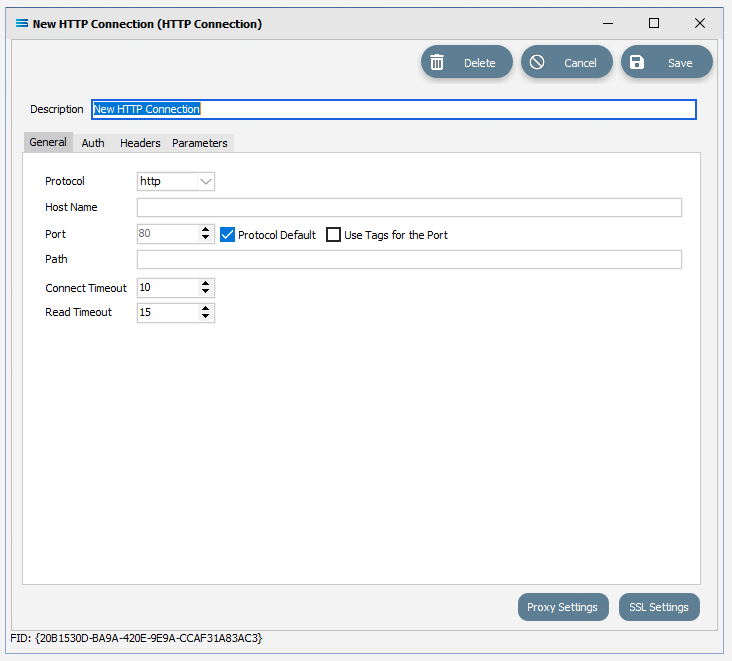
Fields
| Field Name | Description |
|---|---|
| Description | The friendly name for the HTTP Connection. This is the name that the connection will be known as throughout the configuration. You should enter something meaningful to help you recognise the connection. |
Buttons
| Button Name | Description |
|---|---|
| Save | Click OK to Save the connection. |
| Cancel | Click to Cancel any changes made to the connection. |
| Delete | Click to Delete the connection. |
| Proxy Settings | Click to edit the proxy settings used when making the connection to the HTTP service. For information regarding this button, please refer to Proxy Settings. |
| SSL Settings | Click to edit the SSL settings used when making the connection to the HTTP Transport. Click this button for TLS. For information regarding this button, please refer to SSL Settings (Email Settings). |