

Appearance
JSON Definitions
The Statelake scripting environment includes object classes for working with JSON.
JSON (“JavaScript Object Notation”) is a set of rules for encoding a data structure as a string of text characters.
Specific characters such as square brackets [ and ] to identify an array, and curly or squiggly braces { and } to identify a JSON dictionary, are used to mark the structural aspects within the string.
The advantage of encoding data into a relatively plain person-readable string text format of characters such as JSON is that it can be passed easily between a web browser and web server, or can be read from or saved to a text file on disk, making it an ideal data‑interchange language.
Additional information about using JSON in scripting can be found at JSON For Scripts.
General Screen
This screen is required to be completed for all JSON Definitions.
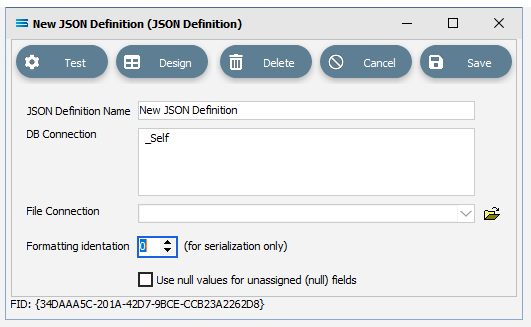
Fields
| Field Name | Description |
|---|---|
| JSON Definition Name | A friendly name for the JSON Definition. |
| DB Connection | The name of the DB Connection attached to this definition. |
| File Connection | The name of the File Connection attached to this definition. |
| Formatting indentation | Specify a value to indent by when serializing. Serialization and deserialization allow objects to be easily stored and transmitted between different systems. When transmitting data or storing them in a file, the data is required to be byte strings, but complex objects are seldom in this format. So serialization will convert these complex objects into byte strings. After the byte strings are transmitted, the receiver will recover the original object from the byte string in a process known as de-serialization. So serialization is the converting of JSON objects into a string, and de-serialization is the process of converting a string into a JSON object. |
| Use null values for unassigned (null) fields | Click to enable the use of null values. |
Buttons
| Button Name | Description |
|---|---|
| Save | Click to Save any changes you have made. All changes will be lost if you do not click the Save button. |
| Cancel | Click to Cancel any changes you have made |
| Delete | Click to Delete this module. You will be asked to confirm your choice. |
| Design | This is a tab button which will take you to a further screen window. Click this button to open the JSON designer canvas. You should populate all of the fields of this main window prior to designing the JSON Definition. |
| Test | Performs a test to ensure that all of the connections specified are valid. |