
Appearance
DB Connection
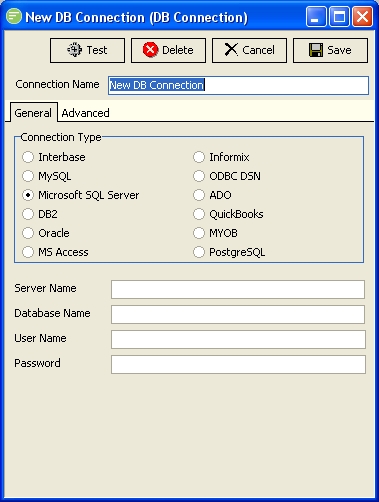
A DB Connection is a pointer to a database. Flow has drivers for the major SQL databases that provides direct high-speed access through the databases client library. ODBC and ADO connections are also available for databases that do not have specific connections.
DB Connections are used on all Data Definitions. For File and Web Definitions this allows you to reference data from a database against the information in the File or Web Definition, although commonly you do not need to reference data in this way and instead use bespoke SQL command in the Map. However since you need to assign a DB Connection to a File and Web Definition it is recommended that you create a default DB Connection that points to your Flow configuration database and use this on the File and Web Definitions.
Fields
| Field Name | Description |
|---|---|
| Connection Name | A friendly name for the DB Connection. |
Tabs
| Tab Name | Description |
|---|---|
| General | General options you need to fill in for all DB Connections |
| Advanced | Advanced options that you can leave at their default setting if desired. |
Buttons
| Button Name | Description |
|---|---|
| Save | Click to save any changes you have made. All changes will be lost if you do not click the Save button. |
| Cancel | Click to cancel any changes you have made |
| Delete | Click to delete this module. You will be asked to confirm your choice. |
| Test | Click to test the connection to the database. This will save the current settings before performing the test. |