
Appearance
Script Editor
Throughout Flow where ever you need to enter script code you will be presented with the Script Editor window. Each script is attached to an Event (Refer Events).
The map editor window has an integrated script editor, while having the same principal design it looks slightly different to the below image
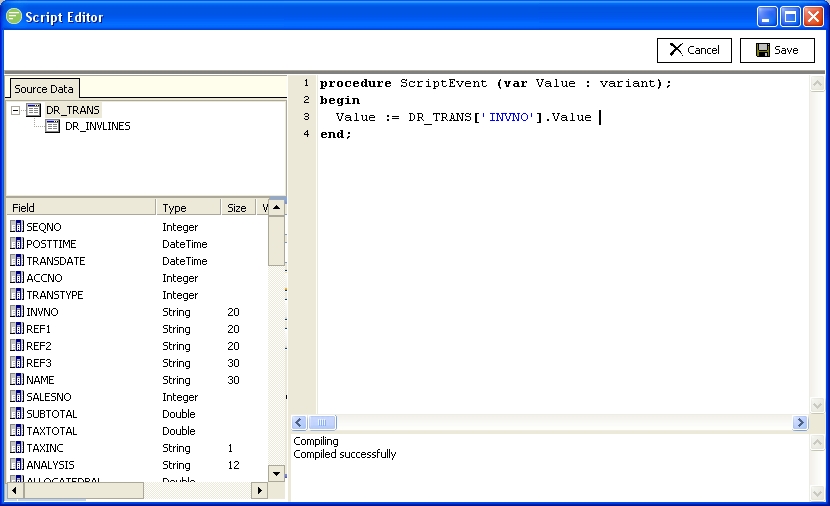
The top half of the script editor is where you enter your script code. The line number will show at the left hand border. When you have finished entering your script you should test compile (right click and select Test Compile) and then click the Save button when satisfied.
The bottom half is the compiler messages section. This shows any messages regarding the compilation of the script code you entered. If there are errors with your script they will be shown here along with the line and character number.
Syntax Highlighting
Script will be highlighted in different colours and boldness depending on what is being represented.
Reading Error Messages
After the following script example is the error that will be returned along with a description on how to interpret the error.
pascal
procedure ScriptEvent (var Value : variant);
begin
if Value<10 thne Value := 10;
end;
This would result in the error Compiler: [Error] (3:13): 'THEN' expected. As you can see there is a spelling mistake in the script code and the compiler is anticipating that it should be the word then. It also indicates the error occurred on the 3rd line starting at the 13th character
pascal
procedure ScriptEvent (var Value : variant);
begin
whlie Value < 10 do Value := Value + 1;
end;
The above code results in the error Compiler: [Error] (3:1): Unknown identifier 'whlie'. In this case there is again a spelling mistake and the compiler does not recognise the word while. It also indicates the error occurred on the 3rd line starting at the 1st character