
Appearance
Service
A Service is a pointer to a published FlowServer instance. Creating a Service will publish the instance of FlowService.
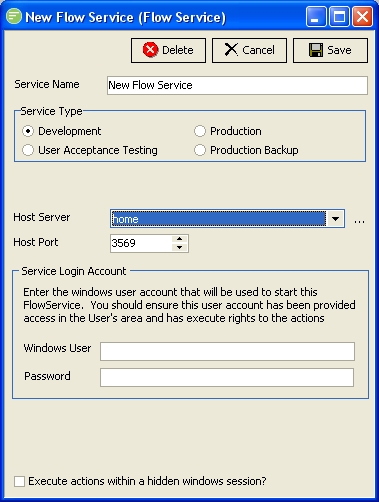
Fields
| Field Name | Description |
|---|---|
| Service Name | A friendly name for the Service |
| Service Type | Select the type of Service |
| Host Server | Select the computer that will host the instance of FlowService. Only computers where "Flow Service Host" installation has been run will be available in the list. ::: tip Ask your system administrator for help if your desired host is not displayed even after clicking  refresh button. It is likely that a firewall setting is preventing communication of your FlowMonitor to the host computer. Port 35699 needs to be opened on the host computer to accept connections from your computer. ::: |
| Host Port | Select the port that the published FlowService instance will listen on for commands from FlowMonitor. You will need to select a different port for each published instance of FlowService on the same host. The port displayed by default should be free as the software will test for available ports. |
| Windows User | Enter the user name of the Windows account that will execute the Service. This is the Windows Account that the FlowService instance will be executed under. This account requires access to perform the Actions as you have configured. This account must have sufficient rights to run in service mode. Flow will assing this right for you if it does not already exist. |
| Password | Enter the password for the above account |
| Execute actions within hidden windows session | Not yet implemented |
Buttons
| Button Name | Description |
|---|---|
| Save | Click to save any changes you have made. All changes will be lost if you do not click the Save button. When saving the Service the resulting FlowService will be created in the Windows Service Control Panel. |
| Cancel | Click to cancel any changes you have made |
| Delete | Click to delete this module. You will be asked to confirm your choice. When deleting the Service the resulting FlowService will be removed from the Windows Service Control Panel |