
Appearance
Data Set
Declaration
<Name of data set from within map window>: TFloClientDataset
TIP
Note: Destination data sets are prefixed with d_
Description
Data Sets listed on the map screen can be referenced in the code using their name. Destination data sets are prefixed with d_.
TIP
You can also work with custom data sets using Data1, Data2, etc. Refer to GetCustomDataSet and GetDataSetFromSource for more information.
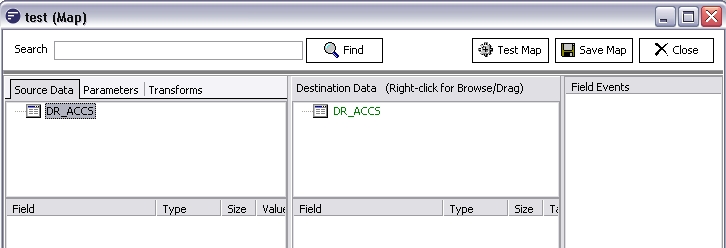
In the following screen shot the DR_ACCS data set under Source Data tab would be referenced as DR_ACCS, whereas the DR_ACCS data set under the Destination Data tab would be referenced as D_DR_ACCS
TIP
Each Data Set has an Active Record. This is the record from which values are read and written if you access the fields of the Data View. The Active Record also controls what records show in any child data sets
TIP
For the examples in this manual we have used the term DATASET. You should replace this with the actual name of your data set as per your map.
Usage
Among other things the following tasks can be achieved by working with the Data Set object
Reference a field from within the Data Set
You can access any of the fields within the Data Set through the FieldByName property. Fields can also be retrieved in shorthand format by simply appending the field name index to the end of the dataview name eg DATASET['Fieldname']. Also refer to Field class
Find a particular record from the Data Set
The Find function can search for a record based on certain field values and make this record the active record.
Add or remove records from the Data Set
You can add or delete records with the Insert and Delete functions
Moving the active record pointer to a different record
You can scroll through the records within a Data Set using the functions First, Last, Next, Prior
Check whether any records exist (or you are at end of the record set)
The EOF property returns true or false depending on whether you are at the end of the recordset (or there are no records to being with).