Appearance
OnMap
Field OnMap
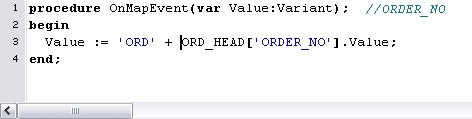
The OnMap event is the main event for providing script code against Fields. You can alternatively split the script and attach some to the BeforeMap and AfterMap events of the field, however this is rarely used. It is far easier to have the entire script against the OnMap event.
The OnMap event has one parameter called Value. This parameter represents the value of the field this event is against. By setting this parameter you are setting the value of the field.
TIP
The BeforeMap and AfterMap events on the field also have a Value parameter that represents the value of the field. Any Value set in the field's BeforeMap event will be the starting Value of the OnMap event. Similarly, any Value set in the OnMap event will be the starting Value of the field's AfterMap event.
Setting the OnMap event
You can drag fields from the source data definition and drop them on the destination field to automatically create a script. You can further edit the script within the script editor. Alternatively you can create it from scratch by selecting the field and clicking within the script editor area of the screen.
You can add whatever script is necessary to set the value of the field.